
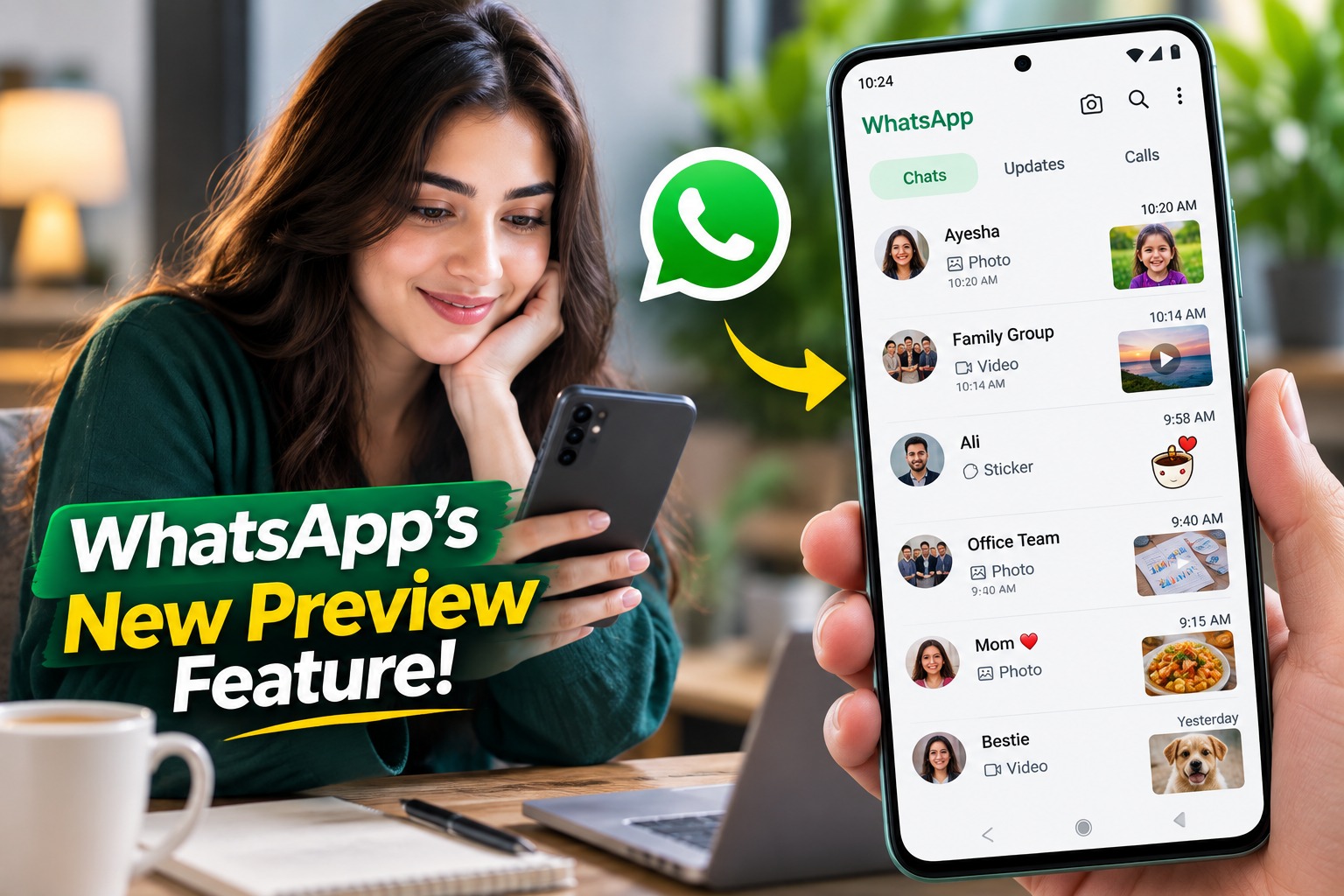
WhatsApp Tests New Android Feature to Preview Photos, Videos and Stickers Without Opening Chats
WhatsApp is constantly refining the way people interact with messages, and its latest Android beta experiment could make the chat list considerably more useful. The messaging platform is reportedly testing a media preview feature that would allow users to get a quick look at recently shared photos, videos and stickers without opening the conversation itself.
For many WhatsApp users, this may sound like a small interface change, but it addresses a familiar problem. At present, when the latest message in a conversation contains a photo or video, the chat list generally indicates the type of media rather than showing users exactly what was shared. To see the actual content, users have to open the chat.
The new experiment aims to remove that extra step by bringing a visual preview directly into the chat list. According to the information provided by WABetaInfo, the feature is being tested with a limited number of Android beta users. WhatsApp frequently uses beta releases to evaluate interface changes before deciding whether they should be expanded to a wider audience. Recent Android beta testing has included several changes to the chat list and media experience, showing that WhatsApp is continuing to make the main messaging interface more visual and convenient.
What Is WhatsApp's New Media Preview Feature?
The proposed feature is designed to display a small visual preview of media when a conversation's latest message contains supported content.
Currently, a chat list entry might tell you that the latest message was a photo or video. That information confirms that media was received, but it does not tell you what the media actually contains. If someone sends several messages and you are trying to find a particular image, you may have to open the conversation and scroll through it.
With the experimental media preview system, the chat list could provide a visual clue before you enter the conversation. Instead of seeing only a generic "Photo" or "Video" indication, users could potentially recognize the recently shared content from its thumbnail.
The reported experiment also extends the idea to stickers. This is particularly useful because stickers can sometimes communicate a reaction or message without any accompanying text. A visible preview could make it easier to understand what was sent at a glance.
The goal is straightforward: give users more information from the chat list while reducing unnecessary taps.
Why Could This Be Useful for WhatsApp Users?
The biggest advantage is convenience.
Imagine opening WhatsApp after several hours and finding dozens of conversations with unread messages. Some contacts have sent text, while others have shared photos, videos or stickers. Under the current approach, identifying which media was sent requires opening individual chats.
A visual preview could make that process much faster. Users would be able to scan the conversation list and immediately recognize the latest shared media.
This could be particularly helpful for families, school groups, work conversations and other chats where photos and videos are frequently exchanged. For example, if someone sends you a picture of a document, product, event or location, the thumbnail could give you enough context to decide whether you need to open the conversation immediately.
The feature could also improve the overall information density of the Chats tab. WhatsApp has already been experimenting with ways to make chat navigation more organized. In May 2026, for example, the company was testing a redesigned chat-list interface that grouped less frequently used lists into a separate "More" section, with the aim of reducing clutter.
These experiments suggest that WhatsApp is looking beyond simple messaging and is trying to make the main Chats screen a more informative control center.
How Would the Media Preview Work?
The basic concept is relatively simple.
When a user receives a new photo or video, WhatsApp already knows that the latest message in the conversation contains media. The experimental design would use that information to display a small preview within the corresponding chat-list entry.
For example, instead of:
Ali — Photo
the conversation could show a small image thumbnail alongside the chat information.
The same principle could apply to videos, where the preview could represent the video's visual content rather than requiring the user to open it first. Stickers could similarly receive a visual representation in the chat list.
This does not necessarily mean that the complete photo or video would play inside the chat list. A thumbnail is primarily intended to provide context. Users would still open the conversation when they want to view the media in full or respond to it.
That distinction is important because a chat-list preview is designed for quick recognition, not to replace WhatsApp's existing media viewer.
The Feature Is Still in Testing
One of the most important points for users is that this should not be treated as a feature available to every Android user.
WhatsApp routinely introduces experimental features to beta testers before making decisions about wider availability. Some features gradually reach more testers, while others can remain under development or change significantly before a public rollout.
Recent WhatsApp beta releases demonstrate this approach. The company has tested changes to the chat list, status placement and media-related interfaces with limited groups of users. For instance, WhatsApp previously tested placing status updates directly at the top of the Chats tab, initially making the feature available to selected Android beta testers.
That means installing a beta version does not automatically guarantee access to every experimental feature. WhatsApp can enable features remotely for selected accounts, regions or testing groups.
Therefore, ordinary WhatsApp users should not be surprised if they update the app and do not immediately see the new media preview.
Could This Change the Way People Use the Chat List?
Potentially, yes.
For years, the chat list has primarily served as a navigation screen: users look at a contact's name, read the latest text preview and decide which conversation to open.
Adding media thumbnails changes that experience. The chat list becomes more visual and can provide information about a conversation without requiring the user to enter it.
This could be especially valuable when multiple conversations contain media. Consider a situation where three different contacts have recently sent photos. A text label such as "Photo" gives little information about which image is important. A thumbnail, on the other hand, can immediately distinguish them.
The same principle applies to videos. A recognizable frame could help users identify whether a video relates to a family event, work project, news clip or something else.
However, the usefulness will depend heavily on how WhatsApp implements the feature. If thumbnails are too small, heavily compressed or visually unclear, the benefit may be limited. WhatsApp will therefore need to find a balance between providing useful previews and keeping the chat list clean.
Privacy Could Be an Important Consideration
A visual preview also raises an obvious privacy question.
Many people use WhatsApp in public places, at work or around family members. A text label such as "Photo" reveals very little about the actual content. A thumbnail could reveal considerably more.
For that reason, the final design may need to consider situations where users do not want media content prominently displayed in the chat list.
This does not necessarily mean the feature creates a new privacy problem by itself. Rather, it highlights an important design consideration: more information on the screen can also mean more information visible to anyone looking at the device.
WhatsApp has previously introduced and tested numerous privacy-oriented features, so the final implementation could potentially include controls or design choices intended to reduce unwanted exposure.
WhatsApp's Broader Focus on a More Visual Interface
The media preview experiment fits into a broader pattern of interface changes across WhatsApp.
The company has been updating the way users interact with photos and videos inside conversations. In July 2026, WhatsApp was also reported to be redesigning the Android media viewer, adding a new interface for reacting and replying directly from the full-screen media experience.
Another earlier Android beta update introduced a gallery interface within the chat attachment sheet, allowing users to browse recent photos and videos without leaving the conversation to open the main gallery application.
Taken together, these changes show a consistent direction: WhatsApp is trying to make media easier to discover, preview and interact with while reducing unnecessary navigation.
The chat-list media preview would extend that philosophy one step further by bringing visual information to the very first screen users see when they open their chats.
What Should Android Users Do Now?
For most users, there is nothing they need to do immediately.
The feature is experimental, and access depends on WhatsApp's testing process. Users who participate in WhatsApp's Android beta program may receive experimental features earlier than users of the standard app, but even beta testers are not guaranteed access.
It is also important to avoid downloading unofficial modified versions of WhatsApp simply to obtain an unreleased feature. Unofficial applications can create security and privacy risks and are not the appropriate way to test WhatsApp's official experiments.
For regular users, the safest approach is simply to keep the official WhatsApp application updated through the appropriate app store and wait for the feature to become available if WhatsApp eventually expands the rollout.
What This Means for the Future of WhatsApp
The media preview experiment may appear relatively minor compared with major WhatsApp updates, but small interface improvements can have a significant effect on everyday usability.
WhatsApp is used for everything from casual conversations and family groups to business communication, education and media sharing. As the volume of messages increases, users need faster ways to understand what is happening without opening every conversation.
A useful thumbnail can communicate more information than a single word such as "Photo" or "Video." That could make the chat list faster to scan and reduce the number of unnecessary taps.
At the same time, WhatsApp will need to consider performance, privacy, screen space and accessibility before making such a feature widely available.
Frequently Asked Questions
Is WhatsApp's media preview feature available to everyone?
No. The feature is being treated as an experimental Android beta feature, so availability can be limited to selected testers. WhatsApp often rolls beta features out gradually rather than giving every beta user immediate access.
Will users be able to view the entire photo from the chat list?
The purpose of a chat-list preview is to provide a quick visual indication rather than replace the full media viewer. Users would still need to open the conversation to interact with the media fully.
Will videos also have previews?
The reported concept includes photos and videos, with stickers also mentioned as part of the media-preview experience. The exact appearance and functionality could change during testing.
Do I need WhatsApp Beta to use the feature?
A beta release is generally where experimental WhatsApp features are tested first, but being a beta tester does not guarantee access. WhatsApp can enable experimental features for selected accounts.
Conclusion
WhatsApp's new Android media preview experiment could make the Chats tab considerably more useful by allowing users to recognize recently shared photos, videos and stickers without immediately opening conversations.
The change addresses a simple but common inconvenience: knowing that someone sent media is not the same as knowing what that media contains. A small visual preview could bridge that gap and make it much easier to scan conversations quickly.
For now, however, users should view the feature as an experiment rather than a confirmed public release. WhatsApp's recent beta activity shows that the company is actively refining both its chat-list design and media experience, so this preview system could evolve before reaching a wider audience.
If WhatsApp ultimately rolls it out broadly, the feature could become one of those subtle improvements that users quickly take for granted: a small thumbnail that saves a tap, provides instant context and makes everyday messaging just a little more efficient.