How Temporary Email Works: SMTP to Throwaway Inbox
How Temporary Email Works Behind the Scenes: From SMTP to Your Throwaway Inbox
By SHARIQ · September 6, 2026 · 9 min read
THE SHORT VERSION
|
Type an address into a sign-up form, click submit, and a verification code appears in a browser tab you opened eleven seconds ago. It feels like a trick. It isn’t. What happened in between is the same century-old mail protocol that carries every other message on the internet — with exactly one setting flipped.
Here is the whole journey, one step at a time.
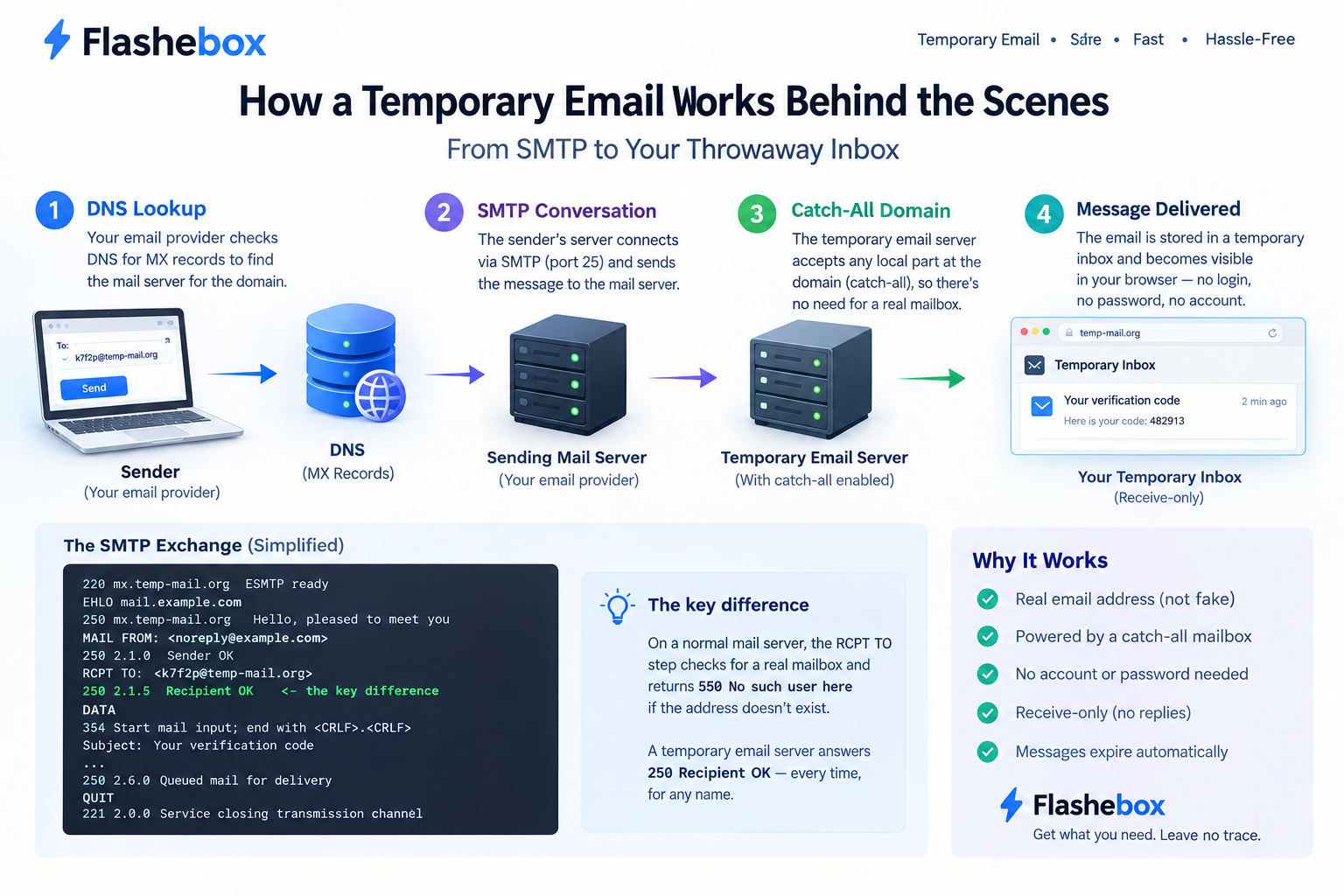
1. DNS decides where the message goes
Every email address splits at the @. The part on the left is the local part — the name of the mailbox. The part on the right is the domain, and it is the only half the internet needs in order to route anything.
When a sender’s mail server has a message for k7f2p@example-domain.com, it doesn’t know or care whether k7f2p is a real person. It asks DNS a single question: which server handles mail for this domain? The answer comes back as one or more MX records — mail exchanger records — each carrying a numeric priority. Lower numbers win, so a domain with an MX at priority 10 and a backup at priority 20 will always be tried at 10 first, with 20 acting as a fallback if the primary refuses to answer.
This is the first thing a temporary email service has to own. Not an inbox, not an account system — a domain with MX records pointing at a mail server it controls.
2. The SMTP conversation
With an address in hand, the sending server opens a TCP connection on port 25, the port reserved for server-to-server mail transfer. (Port 587 is the one your own mail app uses to hand a message to your provider; the two are often confused, and they do different jobs.)
What follows is a short, strictly ordered exchange defined by SMTP. Both sides take turns, and every server reply begins with a three-digit code whose first digit tells you everything: 2 means it worked, 3 means keep going, 4 means try again later, 5 means never.
SMTP SESSION · PORT 25 220 mx.example-domain.com ESMTP ready EHLO mail.some-website.com 250 mx.example-domain.com Hello, pleased to meet you MAIL FROM: 250 2.1.0 Sender OK RCPT TO: 250 2.1.5 Recipient OK <- the decisive moment DATA 354 Start mail input; end with Subject: Your verification code (headers, body, then a single dot on its own line) . 250 2.6.0 Queued mail for delivery QUIT 221 2.0.0 Service closing transmission channel |
A simplified SMTP session. The reply to RCPT TO is where a normal server and a temporary one part company.
Look closely at the RCPT TO line. On an ordinary mail server, this is the moment of judgment: it checks the local part against its list of real mailboxes and answers 550 No such user here if nobody by that name exists. That rejection is why invented addresses bounce.
A temporary email server answers 250 Recipient OK instead. Every time. To any name.
3. The catch-all: one setting, the entire product
The mechanism behind that unconditional yes is a catch-all, also called a wildcard mailbox — conceptually *@example-domain.com. Rather than matching the local part against a list of accounts, the server accepts anything at the domain and delivers it into a single stream.
Catch-alls are an old, ordinary feature. Most hosting providers offer them, usually with a warning attached, because for a personal or business domain a catch-all is a liability. Spammers run dictionary attacks against domains — firing thousands of plausible names at the server to see which are accepted — and a catch-all says yes to all of them, so a domain that once received twenty messages a day starts receiving twenty thousand.
For a disposable email service, that same property is the entire point. There is no mailbox to create before you arrive, which is precisely why you don’t have to register. The address k7f2p@example-domain.com did not exist as a stored object before the moment mail arrived for it, and in a meaningful sense it still doesn’t. It is a filter applied to a shared stream.
THE KEY INSIGHT You are not being given a mailbox. You are being given a label, and shown the slice of the server’s incoming mail that carries it. Everything else about temporary email follows from that one architectural fact. |
4. Storage, sessions, and the address as password
Once accepted, the message is parsed — headers, sender, subject, body, attachments — and written to storage with the local part recorded alongside it. The page in your browser holds the address you were assigned and asks the server, every few seconds, whether anything new has arrived for it. Some services poll on a timer; others hold a persistent connection open and push messages the instant they land. Either way, the effect is the same: mail seems to appear on its own.
What is missing from that description matters more than what’s in it. There is no login step, no session token tied to an identity, no password hash anywhere. The lookup key is the address. Anyone who types the same address into the same service sees the same messages, because from the server’s point of view there is nothing to distinguish them from you.
SECURITY IMPLICATION Mail is usually encrypted in transit: most servers negotiate TLS through STARTTLS before the message body is transmitted. That protects the message on the wire. It does nothing once the message is sitting in a mailbox that has no password. Encrypted delivery and a private inbox are two different things, and disposable email gives you the first without the second. |
5. The delete timer
The last piece is deletion, and it is deliberately unglamorous: a scheduled job that runs on an interval, finds messages older than the retention window, and removes them. Ten minutes, an hour, a day — the exact figure varies by service, and it is a storage-cost decision as much as a privacy one.
There is no trash folder, no archive, and no support process for recovery, because recovery would require knowing whose message it was. Once the job runs, the message is gone in the ordinary sense of the word. If a licence key or download link arrives in a temporary inbox, copying it out is not optional.
6. Why you can’t send from a throwaway address
Almost every temporary email service is receive-only, and people often read that as a missing feature. It’s closer to a load-bearing wall.
Sending mail that actually arrives depends on reputation. Modern receiving servers evaluate three things before trusting a message: SPF, a DNS record listing which servers may send for a domain; DKIM, a cryptographic signature proving the message wasn’t altered and came from the domain it claims; and DMARC, a policy telling receivers what to do when the first two fail. All three exist to answer one question — is this sender accountable?
An anonymous inbox has no answer. A service that let unidentified users send outbound mail would be an open relay within hours, its domains would land on spam blocklists, and the blocklisting would poison inbound delivery too: the same domains would stop being able to receive the verification codes users came for. Many receive-only domains go further and publish an SPF record of v=spf1 -all, a deliberate declaration that mail claiming to come from the domain is forged.
Receive-only isn’t a limitation the service hasn’t gotten around to fixing. It’s the condition of the service working at all.
7. How websites detect disposable domains
Which brings us to the arms race. Sites that don’t want throwaway sign-ups have three main tools, in ascending order of effort.
| METHOD | HOW IT WORKS | HOW SERVICES RESPOND |
|---|---|---|
| Domain blocklists | Check the domain against a community-maintained list of known temp-mail domains. The most widely used list on GitHub is public-domain, actively maintained, and used by the Python Package Index to block registrations. | Rotate to new domains faster than lists absorb them. |
| MX fingerprinting | Look up the domain’s MX records. Dozens of disposable domains often point at the same handful of mail servers, so the pattern gives them away even when the domain is new. | Spread inbound mail across separate infrastructure. |
| Behavioural signals | Flag accounts by what they do — sign-up velocity from one address range, no return visits, trial-only usage. | Nothing at the email layer helps here. |
The practical consequence for you is simple: no disposable service is accepted everywhere, and any that claims otherwise is describing a temporary condition. Custom or less-circulated domains are rejected less often, but the direction of travel is one-way.
What the architecture tells you
Read back through the steps and the honest security model falls out on its own. Real SMTP delivery, real TLS in transit, real storage — but no account, no password, no ownership, and a deletion job that doesn’t ask permission.
That combination is genuinely well suited to one job: catching a message you need once, from a sender you’d rather not give a permanent address to. It is genuinely unsuited to anything you might need to prove, recover, or keep. Not because the engineering is careless, but because the thing that makes it instant — no mailbox, no account, no credential — is the same thing that makes it public and temporary.
Frequently asked questions
Does a temporary email address really exist, or is it fake?
It genuinely exists. The domain has real MX records pointing at a real mail server, and that server completes a real SMTP transaction for every message. The difference is that the address was never created in advance — the server accepts any local part at the domain, so the address effectively springs into existence the moment mail arrives for it.
Why can’t I send email from a temporary address?
Because outbound sending requires authentication, reputation, and accountability, none of which an anonymous inbox has. A service that allowed it would be an open relay within hours, its domains would be blocklisted, and its inbound mail would stop arriving. Receive-only is what keeps the service working at all.
Is mail to a disposable inbox encrypted?
In transit, usually — most mail servers negotiate TLS with STARTTLS, so the message is encrypted between the sending server and the receiving one. That is different from being private. Once the message lands, it sits in a mailbox with no password, readable by anyone who knows the address.
How do websites know I’m using a disposable email address?
Most check the domain against a community blocklist of known temporary email domains. Some go further and inspect the domain’s MX records, since many disposable services route dozens of domains to the same mail servers. Rotating to newer domains delays detection but never defeats it permanently.
What happens to my messages when the inbox expires?
A scheduled job deletes them from storage. There is no archive, no trash folder, and no recovery request, because there is no account the messages could be restored to. Anything you need has to be copied out before the timer runs down.
The bottom line
Temporary email isn’t a workaround bolted onto the side of the mail system. It is the mail system, configured to say yes to everything and forget quickly. Once you can see the catch-all sitting at the centre of it, every other property — the instant access, the absent password, the vanishing messages, the one-way traffic — stops looking like a set of features and starts looking like what it is: a single design decision, followed all the way through.